Showing posts with label Linux. Show all posts

Thursday, April 7, 2016

How to Run Ubuntu on latest Windows 10 Insider Preview Build 14316

Here's How to Run native Bash on Ubuntu on Windows


Step 1: Enroll in the Windows Insider program and Select "Advanced Windows Update options" under "System Settings."


Step 2: Set your update ambition to "the fast ring".


Step 3: Now turn ON "Developer Mode" via Settings → Update & security → For developers, as this new feature is specifically meant for developers.


Step 4: You now need to check for new updates (Insider Preview Build 14316), apply all updates, and then Restart your system.


Step 5: Turn ON the new Windows feature, "Windows Subsystem for Linux (Beta)".


Note: You need a 64-bit version of Windows. Without it, you won't see the new option.


Step 6: Reboot your system.


Step 7: Now Press the Start button and type 'Bash' or simply open Command Prompt and type 'bash.' This will launch a console window powered by Ubuntu's user-space.


Bingo! Now experience Bash just as good as it's in variants of Linux.

Wednesday, March 30, 2016

Microsoft is adding the Linux command line to Windows 10


Microsoft is reaching out to Linux developers in a way that the company never has before. "The Bash shell is coming to Windows. Yes, the real Bash is coming to Windows," said Microsoft's Kevin Gallo on stage at today's Build 2016 keynote. The announcement received an uproarious applause from the crowd. The new functionality will be enabled as part of this summer's Anniversary Update to Windows 10.

"This is not a VM. This is not cross-compiled tools. This is native," he said. "We've partnered with Canonical to offer this great experience, which you'll be able to download right from the Windows Store." Third-party tools have enabled this sort of thing for years, but a direct partnership between Microsoft and Canonical should offer even more flexibility and convenience for developers who prefer using these binaries and tools.

More importantly, it represents Microsoft's refreshing stance on open-source development. VP Terry Myerson teased "more coming soon" in regards to other possibilities signaling a modernized and extremely open Windows 10. This blog post by Microsoft's Scott Hanselman offers a deeper explanation of the move. "This is brilliant for developers that use a diverse set of tools like me," he said. "This is a genuine Ubuntu image on top of Windows with all the Linux tools I use."


Update: Microsoft has posted a very in-depth video covering Bash on Windows, which we've embedded at the top of this article. It should answer just about any question you might have

Wednesday, February 24, 2016

Run Windows 98, Linux, KolibriOS inside your web browser using javaScript And NodeJS


With time, JavaScript engines have grown to become faster and more powerful than ever. Demonstrating the same, a coder has created an online program that emulates x86-compatible CPU and hardware. Using the same, you can run Windows 98 right now in your browser.
The coder writes on his project’s page on GitHub that he decided to work on this as a fun project and learn more about x86 architecture. With some more work, he got Linux and KolibriOS working to make this more usable. Running on top of an x86-emulator in JavaScript, the OS is fast enough to open the programs in your browser.
Apart from a smooth performance of Windows 98 — yes, you are allowed to play a quick game of Minesweeper — Linux works pretty well. Talking about KolibriOS, this graphical OS runs well and takes about 60 seconds to boot. Windows 1.01, FreeDOS, Arch Linux, and Solar OS are also on the menu.
Before you go ahead and run the emulations via following links, here’s a note: Don’t forget to lock the mouse using the lock mouse button at the top.

Sunday, February 14, 2016

“Fysbis” Malware Allow Hacker To Spy On Linux PC

A new malware family known as Fysbis (or Linux.BackDoor.Fysbis) is aiming Linux machines by setting up a backdoor that allows the malware’s author to snoop on victims and perform further attacks.
Fybis showed its first signs in November 2014. However, the security researchers from Palo Alto Networks only recently have been able to understand who is behind the danger and how this threat works.
Researchers after carrying out a detailed inquiry guess that this is not your run-of-the-mill malware that affects computers for the criminals’ monetary gain (adware, Bitcoin mining, banking operations), but a much more sophisticated threat, that’s only used in cyber-espionage campaigns.
However, you are probably safe, if you are a regular Linux user that enjoys playing games on Steam. While on the other hand, if you work in big multi-national corporations or are a government employee and take care of the highly-sensitive Linux servers, data centers, then you should expect at one point or another to come across Fysbis on your machines.
According to Palo Alto researchers, this malware family was developed by none other than the infamous APT 28 cyber-espionage group, also known under the names of Sofacy or Sednit. This group is a fairly well known cyber espionage group believed to have ties to Russia. Their targets have spanned all across the world, with a focus on government, non-profits, defense organizations and various Eastern European governments. There have been numerous reports on their activities, to the extent that a Wikipedia entry has even been created for them.
Most high-profile targets of its short list includes NATO, the Dutch Air Safety Board, the Electronic Frontier Foundation, the Polish government, and many financial institutions and banks.
Many security researchers believe the group may be linked to the Russian government, or at least cooperating with it, as not only many of the group’s targets are associated with Kremlin’s interests, but also because there are several Russian words in the source code of APT 28’s hacking tools.
The fact that the malware can work with or without root privileges is one of the interesting things to note about Fysbis’ make-up. The malware will install itself using whatever user it can, once it comes on the infected system, either by attacker brute-forcing services with exposed ports or by spear-phishing.
Fysbis is a modular Linux trojan / backdoor that implements plug-in and controller modules as distinct classes. This malware includes both 32-bit and 64-bit versions of Executable and Linking Format (ELF) binaries. After the installation, it will performs a few tests to see what kind of capabilities its current user has, and reports the results to a C&C server.
Technically, Fysbis can open a remote shell on the infected machine, can run commands on the attacker’s behalf, find, read, save, execute or delete files, and log keyboard input.
While the malware is quite simple, it still has all the required functions to penetrate systems and exfiltrate data, the security analysts have observed.
If a modular infrastructure believes that the machine is worthy of more probing around, it also allows APT 28 to push other features to targets that are infected.
The malware can receive new modules, and has a small size, because it works irrespective of it having root privileges. One can see why APT 28 values its versatility and selected to add it to its attack resource.
“Despite the lingering belief (and false sense of security) that Linux inherently yields higher degrees of protection from malicious actors, Linux malware and vulnerabilities do exist and are in use by advanced adversaries,” Palo Alto researchers note. “Linux security in general is still a maturing area, especially in regards to malware.”

Thursday, January 21, 2016

Why Is Linux Foundation’s Latest Change,A Bad News For Linux And Open Source?


The Linux Foundation was created as a non-profit technology organization to protect, promote, and advance Linux development and collaboration. The Linux Foundation sponsors the work of Linux founder Linus Torvalds and supports the open source technologies. While the organization works hard to ensure that Linux gets enough recognition, it is fueled by the work and support of its community.
A recent change in the way Linux Foundation elects its representatives has sparked a controversy in the Linux and open source community. Before telling you about the change in representation that was uncovered by Mattew Garrett, a kernel contributor and social activist, I’ll be telling you how Linux Foundation’s board was chosen just a week ago.

Up until how were Linux Foundation board members elected?

10 by platinum members (platinum membership costs $500,000 a year), 3 by gold members (gold membership costs $100,000 a year), 1 by silver members (silver membership costs between $5,000 and $20,000 a year, depending on company size), and 2 by individual members (individual membership costs $99 a year)
The Linux Foundation, understandably, needs funds from platinum, gold, and silver members to operate and work in order to propagate Linux and the open source philosophy. Additionally, the election of two board members by individual members helped to bring in the community perspectives into the decision-making at the board level.

Change in the community representation in Linux Foundation board

Matthew Garrett noticed a big change in the community representation this Friday. Organization’s by-laws were amended to erase the provision of the selection of 2 board members by individual members. The new version of by-laws states that no affiliate member may be involved in the election of directors. Read the older version here and compare.
This change is also reflected in the definition of affiliate members and advantages provided to them. Known as “Individual Membership” until last year, it gave you “the ability to run for and vote for a Linux Foundation board seat and influence the direction of the foundation”. The plan has been revised to bring a weaker position called “Individual Supporter“, taking away the voting rights of individual members.


                                               The erased clause in by-laws
Coincidently, everything happened after Karen Sandler — executive director of Software Freedom Conservancy, an organization working for GPL enforcement — announced her plan to stand for the Linux Foundation board membership. Notably, the Linux Foundation hasn’t shown much excitement about GPL enforcement in the past and the SFC is itself funding a lawsuit against one member of Foundation for violating GPL terms.
This could be one of those just-a-coincidence incidents, but it seems that the Linux Foundation doesn’t like the community representation anymore in its board. This step also raises questions on Foundation and its love for corporates.
This negative step ignores the Linux community that performs an important task of writing parts of Linux kernel and promoting it. I wonder what Linus Torvalds has to say about this issue.

Monday, January 4, 2016

Ransom32 - The First Ransomware based on Javascript & Cross Platform Compatibility


A new Ransomware as a Service, or RaaS, called Ransom32 has been discovered that for the first time uses a ransomware written in Javascript. Located on an underground TOR site, the Ransom32 RaaS is a simple, but efficient, service where anyone can download and distribute their very own copy of the ransomware executable as long as they have a bitcoin address.  For offering this service, the developers of Ransom32 take a 25% cut of all ransom payments and then forward the rest to the bitcoin address an affiliate entered when they joined the affiliate program.


The first Javascript Ransomware

What makes this ransomware unique is that it is the first ransomware programmed entirely in Javascript, HTML, and CSS.  This ransomware uses the NW.js platform that allows developers to create native applications for Linux, Mac, and Windows using HTML5, CSS3, Javascript, and WebGL.  Using NW.js a developer can take their scripts and html and package them into a Chromium executable that when executed automatically runs the embedded JS and HTML.

What makes the Ransom32 RaaS so scary is that Javscript and HTML are cross-platform and run equally as well on Macs and Linux as they do in Windows. This means that with some minor tweaks, the Ransom32 developers could easily make NW.js packages for Linux and Mac computer. Though there does not seem to be any indication that this is being done as of yet, doing so would be trivial.

It is inevitable that ransomware will be created for operating systems other than Windows Using a platform like NW.js just brings us one steps closer.

First Glance:

Ransom32 was first reported by infected users  Fabian Wosar of Emsisoft and Security Researcher xXToffeeXx searched for a sample they stumbled upon the Ransom32 TOR affiliate service. It is very easy for an affiliate to join this RaaS as all that is needed is a bitcoin address that the affiliate's share of the ransom payment will be sent to.


Once a bitcoin address is submitted, an affiliate will be shown an Affiliate Console where they can see the statistics for their personal distribution campaign and configure various settings on how the ransomware should be executed.


This affiliate console will contain statistics that include the number of people that successfully installed the client, the number of people that were shown the lock screen when the encryption was completed, the number of bitcoin transactions to your address, and the amount of ransom payments sent to your payout address.
In the console an affiliate will also be able to configure various settings for how the Ransom32 executable should run.

The listed settings and the Ransom32 developer's descriptions for them are:
BTC amount to ask:  BTC amount to ask. Don't be too greedy or people will not pay.

Fully lock the computer: By default the lockscreen will popup each X seconds after being minimized. You can configure it so the user will not be able to minimize the lock screen. The downside is that will be more difficult for the users to check that their files were truly encrypted and also they will need to find another method to send your Bitcoins as the browser will be blocked too.

Low CPU Usage: Will encrypt files at 0-25% speed while the lock window is not shown, so the process won't be noticeable in the task manager by an advanced user because of high CPU consumption.

Show the lockscreen before encrypting: By default the client will show the lockscreen after encrypting part of the files in the computer (filesize under 50 Mb) and continue encrypting in the background. You can tell it to show the lockscreen right after installing, before encrypting any file in the background. The downside is that if the user tries to check his files just when the window pops in, he will notice that any file has been encrypted (although it is encrypting while is running).

Show a message Box: This box will be shown before installing and before any latent timeout is applied.

Latent Timeout: The client will "wake up", connect to the server and start encrypting after this amount of seconds passed after installing. The client won't connect to the server until it wakes up (more stealth), so you won't notice an install in your stats until this moment. NOTE: The client will not save the latent info as-is. Will be mixed with some data so is not understandable at first sight. Because of this, expect a 0-4 minutes drift to your timeout.


Once an affiliate has configured the ransomware to their liking, they simply need to click on the download button to generate and download their customized copy of Ransom32.  This download is a self-extracting RAR file that weighs in at 22MB and when extracted totals over 67MB. Once the customized ransomware is downloaded, it is up to the affiliate to determine how it should be distributed.
An important feature for any "commerce" campaign is to be able to track its performance. As only a bitcoin address is required to join the affiliate program, it is very easy for an affiliate to track each distribution method's performance by simply using a different address for each campaign.


Encryption Process

The download that is generated by the affiliate is actually a 22MB self-extracting archive that when extracted is over 67MB.  When this executable is run, it will extract numerous files into the C:\Users\User\AppData\Roaming\Chrome Browser folder and creates a shortcut in the Start Menu's Startup Folder called ChromeService so that the ransomware starts at login.  The shortcut points to a chrome.exe executable that is actually a NW.js package that contains Javascript code that will encrypt the victim's data and then display a ransom note.
The files extracted into the Chome Browser folder are:
  • chrome - The Chromium license agreement.
  • chrome.exe - This is the main executable for the malware and is a packaged NW.js application bundled with Chromium.
  • ffmpegsumo.dll - HTML5 video decoder DLL that is bundled with Chromium.
  • g - The settings file that contains various information used by the malware. This information includes the affiliate's ransom amount, bitcoin address that they receive payments on, and error message that is shown in a messagebox if the Show a message Box setting was enabled.
  • icudtl.dat - File used by Chromium
  • locales - Folder containing various language packs used by Chrome.
  • msgbox.vbs - The messagebox displayed if the affiliate enabled the Show a message Box setting.
  • nw.pak - Required for the NW.JS platform.
  • rundll32.exe - Renamed TOR executable so that the malware can communicate with the TOR Command and Control server.
  • s.exe - Renamed Shortcut.exe from OptimumX. This is a legitimate program used by the malware to create the ChromeService shortcut in the Startup folder.
  • u.vbs - A VBS script that deletes a specified folder and its contents.


 At glance it looks suspiciously like a copy of the famous browser "Chrome". The forgery is revealed only in that it does not have a digital signature and version information is missing. Further analysis they expose as a packed NW.js application.


When encrypting your data, Ransom32 will target only specific file extensions and encrypt them using AES encryption. The targeted file extensions are:

* .jpg, * .jpeg, * .raw, * .tif, * .gif, * .png, * .bmp, * .3dm, * .max, * .accdb, * .db, * .dbf, *. mdb, * .pdb, * .sql, *. * SAV *, *. * SPV *, *. * grle *, *. * MLX *, *. * SV5 *, *. * game *, *. * Slot *, * .dwg, * .dxf, * .c, * .cpp, * .cs, * .h, * .php, * .asp, * .rb, * .java, * .jar, * .class, * .aaf, * .aep, * .aepx, * .PLB, * .prel, * .prproj, * .aet, * .ppj, * .psd, * .indd, * .indl, * .indt, *. indb, * .inx, * .idml, * .pmd, * .xqx, * .xqx, * .ai, * .eps, * .ps, * .svg, * .swf, * .fla, * .as3, * .as, * .txt, * .doc, * .dot, * .docx, * .docm, * .dotx, * .dotm, * .docb, * .rtf, * .wpd, .wps, *. msg, * .pdf, * .xls, * .xlt, * .xlm, * .xlsx, * .xlsm, * .xltx, * .xltm, * .xlsb, * .xla, * .xlam, * .xll, * .xlw, * .ppt, * .pot, * .pps, * .pptx, * .pptm, * .potx, * .potm, * .ppam, * .ppsx, * .ppsm, * .sldx, *. sldm, * .wav, * .mp3, * .aif, * .iff, * .m3u, * .m4u, * .mid, * .mpa, * .wma, * .ra, * .avi, * .mov, * .mp4, * .3gp, * .mpeg, * .3g2, * .asf, * .asx, * .flv, * .mpg, * .wmv, * .vob, * .m3u8, * .csv, *. EFX, * .sdf, * .vcf, * .xml, * .ses, * .dat


 Notice how Ransom32 also uses wild cards in the targeted file extensions. This allows the program to to target a greater variety of extensions. For example, with the .*sav* extension, not only will .sav files be targeted, but also files ending with .save, .gamesave, or .mysaves will be encrypted as well.  When encrypting data files, it does not rename a victim's files and will not encrypt any files located in the following folders:

  • : \ Windows \
  • : \ winnt \
  • ProgramData \
  • boat\
  • temp \
  • tmp \
  • $ RECYCLE.BIN \ 


When it has finished encrypting your data it will display the Ransom32 ransom lock screen/ransom note as shown below.


The Ransom32 lock screen will display information that tells the victim what has happened to their files, how to pay the ransom, the ransom amount, and the bitcoin address a ransom payment is sent to. The language used by the lock screen is shown in either English or Spanish, with the default appearing to be English. Last, but not least, this screen allows you to decrypt one file for free to prove that it can be done.


 Encryption is performed under the AES (Advanced Encryption Standard) 128-bit key with the CTR mode. For each file, a new key is created. This in turn with the RSA algorithm and a public key encrypted, which was retrieved in the first communication with the C2 server.
 

Extract from the individual protocol exchange between Ransom32 and the C2 server to Bitcoin address (violet) and retrieve public keys (length in yellow, key in green).
 
The encrypted AES key is used together with the AES-encrypted data in the - saved file - now also encrypted.
 
The malware also offers to decrypt a single file again to prove the victim that the malware developer encryption can actually pick up again. For this purpose it sends the encrypted AES key of the selected file to the C2 server, which then sends back the decrypted AES key for the file.


Files installed by Ransom32:

%Temp%\nw3932_17475
%AppData%\Microsoft\Windows\Start Menu\Programs\Startup\ChromeService.lnk
%AppData%\Chrome Browser\
%AppData%\Chrome Browser\.chrome\
%AppData%\Chrome Browser\.chrome\cached-certs
%AppData%\Chrome Browser\.chrome\cached-microdesc-consensus
%AppData%\Chrome Browser\.chrome\cached-microdescs
%AppData%\Chrome Browser\.chrome\cached-microdescs.new
%AppData%\Chrome Browser\.chrome\lock
%AppData%\Chrome Browser\.chrome\state
%AppData%\Chrome Browser\chrome
%AppData%\Chrome Browser\chrome.exe
%AppData%\Chrome Browser\ffmpegsumo.dll
%AppData%\Chrome Browser\g
%AppData%\Chrome Browser\icudtl.dat
%AppData%\Chrome Browser\locales\
%AppData%\Chrome Browser\msgbox.vbs
%AppData%\Chrome Browser\n.l
%AppData%\Chrome Browser\n.q
%AppData%\Chrome Browser\nw.pak
%AppData%\Chrome Browser\rundll32.exe
%AppData%\Chrome Browser\s.exe
%AppData%\Chrome Browser\u.vbs


Unfortunately, at this time there is no known way to decrypt the files for free, but if anything changes we will post about it here.


Source: Emsisoft & BleepingComputer


Saturday, October 17, 2015

How to Remain Secure Against The NSA Data Decryption Attack.

Researchers Alex Halderman and Nadia Heninger presented a research stating that how NSA Exploits Flaws to Decrypt Huge Amounts of Communications Instead of Securing the Internet. The NSA can decrypt a huge amount of HTTPS, SSH, and VPN connections by means of the Diffie-Hellman key exchange algorithm with 1024-bit primes. Researchers Alex Halderman and Nadia Heninger were also a part of a research group that published a study of the Logjam attack, which took advantage of neglected and obsolete code to impose downgraded, 512-bit parameters for Diffie-Hellman.
While major browser vendors such as Internet Explorer, Chrome, and Firefox have already removed support for 512-bit Diffie-Hellman but however, the 1024-bit Diffie-Hellman is still supported despite being vulnerable to NSA surveillance.
Here's some tips on how to protect yourself from the NSA Data Decryption Attacks.

Web Browser

Always have a look at the Encryption Algorithms & make sure you're using the strongest crypto, that your browser supports. There's an excellent tool, How's My SSL?, that will to test your browser's cipher suite support. The relevant area of the page is the bottom, Given Cipher Suites. You want to make sure that you don't see the text "_DHE_" in the list of ciphersuites - although the Elliptic Curve variant of Diffie-Hellman, represented by suites with "_ECDHE_" is okay. It is important to note that there is a trade-off here: removing your clients support for "_DHE_" ciphers will eliminate the risk of this attack, but it may also removeForward Secrecy support altogether for some sites. Here's how to remove those "_DHE_" cipher suites if you still have them:

Firefox

(tested with 40.0.3)
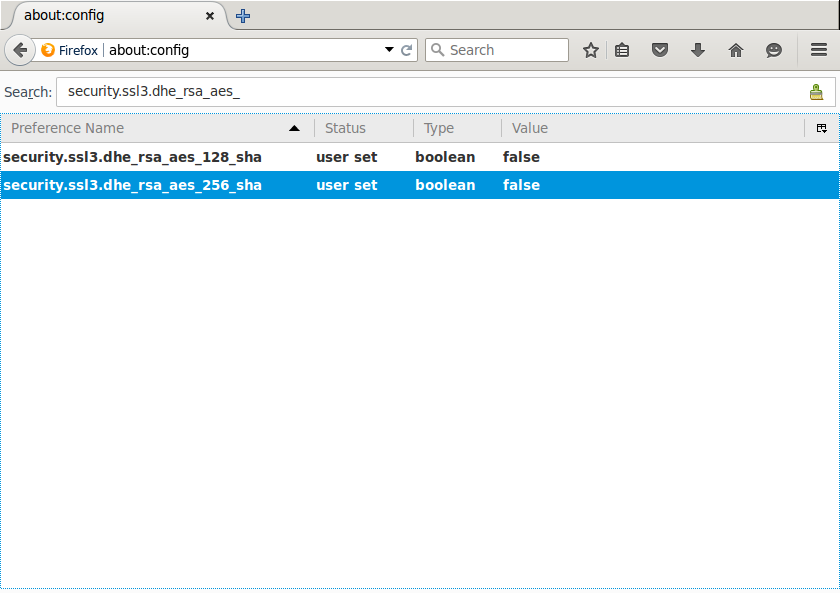
Open a new tab, enter "about:config" into the location bar and hit the "Enter" key. If you get a warning page, click "I'll be careful, I promise!" This will bring you to the Firefox configuration settings. In the search bar up top, type ".dhe_" and hit the "Enter" key. This should result in two settings being displayed: "security.ssl3.dhe_rsa_aes_128_sha" and "security.ssl3.dhe_rsa_aes_256_sha". Double-click both of them to change the value from "true" to "false".
config settings
Now, if you refresh the How's My SSL page, the "_DHE_" ciphersuites should be gone!

Chrome

After following these steps in the following operating systems, refresh the How's My SSL page, the "_DHE_" ciphersuites should be gone. Note that the hex values for the blacklist correspond to the TLS Cipher Suite Registry

OSX

(tested with 46.0.2490.71, OSX 10.10.5)
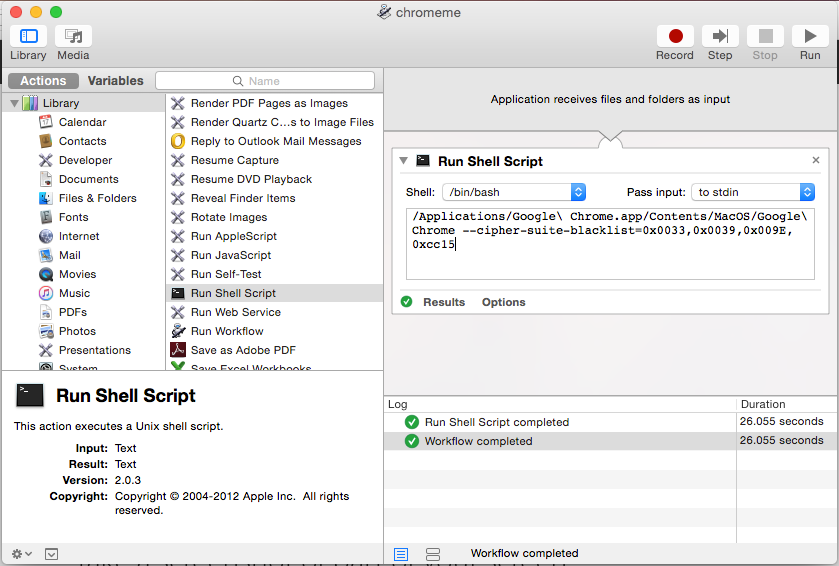
Open "automator" and double-click "Run Shell Script". Replace the "cat" command with the following:
/Applications/Google\ Chrome.app/Contents/MacOS/Google\ Chrome --cipher-suite-blacklist=0x0033,0x0039,0x009E,0xcc15
automator
Save the application to your applications folder with whatever filename you like. In finder, you can drag the application to your dock and use that to launch Chrome without the vulnerable ciphers.

Windows

(tested with 46.0.2490.71, Windows 7)
Right-click the shortcut to your Chrome application, click "properties" and then add the following to the end of the "target": "--cipher-suite-blacklist=0x0033,0x0039,0x009E,0xcc15"
The target then should be similar to the following:
"C:\Program Files (x86)\Google\Chrome\Application\chrome.exe" --cipher-suite-blacklist=0x0033,0x0039,0x009E,0xcc15
From now on, open Chrome from this shortcut.

Linux

Tested with 46.0.2490.13, Ubuntu 14.04 LTS
Starting chrome from the command line with the following flag removes the undesired ciphers:
google-chrome --cipher-suite-blacklist=0x0033,0x0039,0x009E,0xcc15

SSH

An excellent guide for hardening your SSH configuration was released after revelations that the NSA can sometimes decrypt SSH connections. The guide is available here.

VPN

OpenVPN

Most VPN software supports the ".ovpn" file extension used by OpenVPN. Many VPN providers will also provide ".ovpn" files to connect using OpenVPN. You can query your OpenVPN client for the ciphers it supports with the following command:
openvpn --show-tls
This list should be ordered by strongest ciphers first. Recent versions of OpenVPN will have "ECDHE" support, but in order to connect your VPN provider has to support the desired cipher as well. Ciphers with just "DHE" can be vulnerable, however OpenVPN often has VPN servers generate their own primes, which mitigates the risk of the precompute attack. Edit your ".ovpn" file with a line containing the strongest ciphers and testing it against your VPN provider to see if it connects properly:
tls-cipher [cipher-1]:[cipher-2]:[cipher-3]
If it does not connect with strong ciphers, contact your VPN provider and request they update their servers to support the strongest ciphers available.

Monday, October 5, 2015

How to Download Torrent File in linux OS

Deluge is one of the most popular used torrent downloaders for linux operating syatem. It's current version is stable and easier to use like any other torrent client.Deluge team put effort to makes it more stable by providing final fix update. The current stable version of Deluge Deluge 1.3.12 with some bug and crash fixes and enhancements. Deluge is available forUbuntu, Linux Mint, Linux Lite, etc.

Install Deluge in linux OS

Terminal:

sudo apt-get install deluge
Deluge official repositories is already available in ubuntu os but the repository might be out of date.The update is not yet available in the official repository of ubuntu, but don't worry you can add the official Deluge PPA to ubuntu os easily.

Use the following commands to add PPA and then update local list of repositories and then upgrade to Deluge 1.3.12.


Deluge PPA Repository

The ​Deluge PPA contains the latest Deluge releases for Ubuntu.

sudo add-apt-repository ppa:deluge-team/ppa sudo apt-get update sudo apt-get install deluge


Removing 

sudo apt-get remove deluge


Install μTorrent in Ubuntu 


Ubuntu 14.04  / 13.10 / 13.04 / 12.10 / 12.04 / 11.10 userso through the below to install the dependency library.
sudo apt-get install libssl0.9.8:i386
Now Open a Terminal and Enter the following command to download.
wget http://download.utorrent.com/linux/utorrent-server-3.0-25053.tar.gz
After downloading, move to the Download directory where the file downloaded by user is located.
For example if the downloaded file is in Downloads directory then use the below command.
cd Downloads/
Now copy the Downloaded tar file to opt directory, use the following command to copy the file to opt directory.
sudo cp utorrent-server-3.0-25053.tar.gz /opt/
Now change the current directory to the opt directory and extract the tar file. Run the following commands one by one.
cd /opt/sudo tar -xvf utorrent-server-3.0-25053.tar.gz
Change the permission of the extracted folder.
sudo chmod 777 -R utorrent-server-v3_0/
Create a symbolic link so that you can run the torrent server from terminal.
sudo ln -s /opt/utorrent-server-v3_0/utserver /usr/bin/utserver
That’s it. Now you can start the utorrent server by using the following command in terminal.
utserver -settingspath /opt/utorrent-server-v3_0/ &