Sunday, October 12, 2014

All about Cyclone

As the tropical cyclone named Hudhud originated in Andaman sea is approaching landfall to Andhra Pradesh and Orrisa, its very important for us to know each and every bit of it and also about its siblings who has already visited India and neighboring countries or are yet to visit.

What you should know about cyclones
  1. Definitions
  2. What are the Process of cyclone Formation
  3. What are different monitoring and naming organization

Definitions

Tropical storms, cyclones, hurricanes and typhoons, although named differently, describe the same disaster type.
Essentially, these disaster types refer to a large scale closed circulation system in the atmosphere which combines low pressure and strong winds that rotate in same direction as Earth. This is usually characterized by inward spiraling winds that rotate anti-clockwise in the Northern Hemisphere and clockwise in the Southern Hemisphere of the Earth.

The system is referred to as a "cyclone" in the Indian Ocean and and South Pacific, "hurricane" in the Western Atlantic and Eastern Pacific and "typhoon" in the Western Pacific.


Process of Cyclone Formation

Cyclogenesis describes the process of cyclone formation and intensification
  • Scale of Measurement

    • Macroscale: The macroscale deals with systems with global size.
    • Synoptic scale: Synoptic scale systems cover a portion of a continent, such as extratropical cyclones, with dimensions of 1,000-2,500 km (620-1,550 mi) across
    • Mesoscale: The mesoscale is the next smaller scale, and often is divided into two ranges: meso-alpha phenomena range from 200-2,000 km (125-1,243 mi) across (the realm of the tropical cyclone), while meso-beta phenomena range from 20–200 km (12-125 mi) across (the scale of the mesocyclone).
    • Microscale: The microscale is the smallest of the meteorological scales, with a size under two kilometers (1.2 mi) (the scale of tornadoes and waterspouts).
     
  • Types of Cyclone: Tropical, subtropical, extratropical?

    1. An extratropical cyclone forms. Extratropical cyclones have cold air at their core, and derive their energy from the release of potential energy when cold and warm air masses interact. These storms always have one or more fronts connected to them, and can occur over land or ocean. An extratropical cyclone can have winds as weak as a tropical depression, or as strong as a hurricane. Examples of extratropical cyclones include blizzards, Nor'easters, and the ordinary low pressure systems that give the continents at mid-latitudes much of their precipitation.
       
      Extratropical Cyclone
    2. If the waters under the extratropical cyclone are at least 21C (70F), thunderstorm activity will gradually build inside the storm and moisten and warm the lower levels. Over time, the core of the storm may gradually go from cold to warm, and the storm will start getting some of its energy from "latent heat", which is the energy released when water vapor that has evaporated from warm ocean waters condenses into liquid water. Latent heat is what powers tropical cyclones. At this point, the storm is called subtropical. If the winds are already more than 39 mph, it is called a subtropical storm. If the winds are less than 39 mph, then it is called a subtropical depression. So, you don't need to start with a subtropical depression in order to get a subtropical storm.                                          
      Thenderstorm
    3. If the subtropical storm remains over warm water for several days, it may eventually become fully tropical, and be called a tropical storm. This happens when thunderstorm activity starts building close to the center of circulation, and the strongest winds and rain are no longer in a band far from the center. The core of the storm becomes warm, and the cyclone derives all of its energy from the "latent heat" released when water vapor that has evaporated from warm ocean waters condenses into liquid water. One does not find warm fronts or cold fronts associated with a tropical cyclone.
    The difference between a subtropical storm and a tropical storm is not that important as far as the winds they can generate, but tropical storms generate more rain. There is no such thing as a subtropical hurricane. If a subtropical storm intensifies enough to have hurricane force winds, then it must have become fully tropical.

Warning and Identification of Tropical Cyclone

Seven tropical cyclone "basins" where storms occur on a regular basis around the world and the Regional Specialized Meteorological Centers(RSMC) in charge are
 
Regional Specialized Meteorological Centers

These RSMCs are responsible for monitoring and prediction of tropical cyclone in their respective region. They are also responsible to name the cyclones.
All the seven RSMCs comes under Five regional Bodies falling in their respective region. These Bodies are governed by World Meteorological Organization(WMO).
Regional Bodies under WMD
The WMO/ESCAP Panel on Tropical Cyclones at its twenty seventh Session held in 2000 in Muscat, Sultanate of Oman agreed in principal to assign names to the tropical cyclones in the Bay of Bengal and Arabian Sea. After long deliberations among the member countries, the naming of the tropical cyclones over north Indian Ocean commenced from September 2004.

Naming of Tropical Cyclone

Hurricanes and tropical cyclones in the Atlantic have had their own names since 1953, a convention begun by Miami's National Hurricane Centre and maintained and updated by the World Meteorological Organization (WMO), a Geneva-based agency of the United Nations. 
But naming came to South Asia and the Middle East only recently. For years cyclones that originated in the north Indian ocean were anonymous affairs.
But finally in 2004, Eight countries - India, Pakistan, Bangladesh, Maldives, Myanmar, Oman, Sri Lanka and Thailand clubbed together and agreed on their favorite names. They came up with a list of 64 names - eight names from each country - for upcoming cyclones.

Tropical Cyclone naming

Last cyclone originated in Arabian sea in June this year was named Nanauk by Myanmar. Now it was Oman chance to name the cyclone from the list and this cyclone is named as 'Hudhud'. The next cyclone will be named by Pakistan and that will be Nilofar.

You can view the progression of Hudhud declared as very sever cyclonic storm by Indian Meteorological Department.
Powered by WunderMap

Courtesy: Google, Wikipedia, WMD, IMD, WunderMap

Friday, October 10, 2014

How to share your android mobile internet with PC

Android Phone has three different methods to share its mobile internet with PC.
  1. USB tethering : This is most easy method to share internet with your PC. Just connect your phone to PC through USB cable and start USB tethering. Goto Settings > Wireless & networks > More... > Tethering & Portable Hotspot > USB tethering. PC will automatically configure itself to use the internet from phone's modem.
  2. Bluetooth tethering : This methods should be our last option to use the internet on PC as its data transfer speed is very low.
  3. Wi-Fi Hotspot : This method can only be used if both the devices are wifi enabled. If your PC don't have wifi module, you can use external Wireless Adapter .


    How to setup WiFi Hotspot on your android mobile


    1. Goto  Settings > Wireless & networks > More... > Tethering & Portable Hotspot > Wi-Fi Hotspot
    2. Click on Setup Wi-Fi Hotspot
    3. It will ask for Network SSID. Give any name which you like. It just used to identify your device when you connect your phone to PC. 

    Select WPA2 PSK for security mode and provide suitable password to prevent any unauthorized access of your phone. Click Save to save the settings.

    • Before starting Wi-Fi hotspot, switch ON Wifi module in PC.
    • Then switch ON Wi-Fi hotspot. Computer will automatically scan and display your network SSID which you provided while setting Wi-fi hotspot as shown in below picture.

    Wednesday, October 8, 2014

    How to configure Outlook for Zimbra account


    These Instruction are successfully tested in Outlook 2013. These settings will not work in network computers which uses proxy servers to connect to the internet.

    Add New Account

    If this is the first time Outlook has been used, you will be asked if you would like to set up an account. Select Yes and click Next. Otherwise, go to Account Settings.
    • Outlook 2007: Open the Tools menu and click Account Settings...
    • Outlook 2013: Go to the File tab, select Info if it is not already selected, and click Add Account.

    Auto Account Setup

    Choose Manual setup or additional server types and click Next.

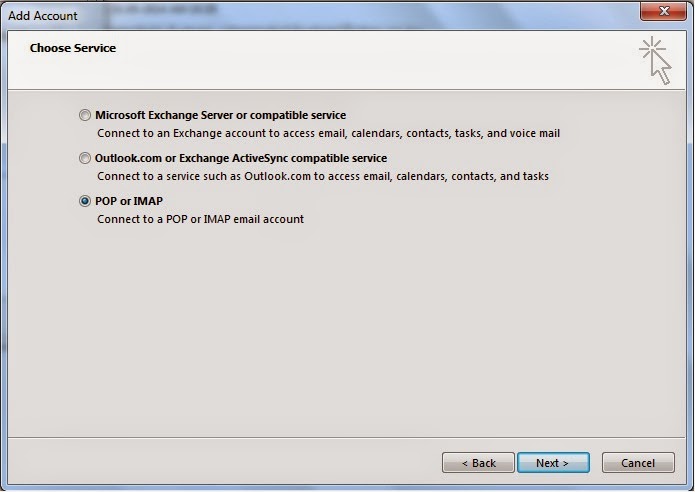
    Add Account


    Choose Service

    Choose POP or IMAP and click Next.


    Choose service


    Internet Email Settings


    POP/IMAP

    Your Name: Your real name used in your Email Account.
    E-mail Address: Your email address for this account.
    Incoming mail server: This is the internet location name of your incoming mail server.
    Outgoing mail server (SMTP): This is the internet location name of your outgoing mail server.
    User Name: This is the login name for your email account.
    Password: Enter your password if you want Outlook to remember it for you. Remember Password must be checked for you to enter your password.
    Remember Password: You may choose to save your password to avoid entering it every time you check your email.
    Require logon using Secure Password Authentication (SPA): Make sure this is turned on.


    More Settings...
    To set up a secure connection click this button to continue.

    Outgoing Server


    Outgoing Server
    My outgoing server (SMTP) requires authentication: Be sure to turn this on.

    Use same settings as my incoming mail server: This tab should be selected.

    Advanced


    Incoming server (IMAP): This value should be 993.
    Use the following type of encrypted connection: Use "SSL" encryption.
    Outgoing server (SMTP): Port 25 is default value selected by Outlook.
    Use the following type of encrypted connection: Use "TLS" encryption.
    Server Timeouts: The maximum value (10 minutes) works best for both on-campus and off-campus access.
    Root folder path: This is the mail folder location on your email account. Set to blank.

    Leave all other settings as default and press OK.

    Test Account Settings


    Click Test Account Settings... once you have made all necessary configurations. If you did not tell Outlook to remember your password, you will be prompted to enter it now.

    If everything is correct, you should see a screen like the one below. Close the Test Account Settings window, then click Next to finish the setup process. If the test fails, recheck the configuration settings and try again.


    Test


    The test has been done on Outlook 2013. Basic settings are same in case of lower version of Outlook too. You can try with your own Outlook versions.


    Turbo FAST Cheats

    Unlimited Tomatoes, All Snails Unlocked.                                                                                                                                                             Turbo FAST Cheats
    Turbo FAST Cheatsclick on the image to see more screenshot

    UPDATED ON JANUARY 12, 2016

    UPDATE NOTE
     • Turbo FAST v2.0.3

    DESCRIPTION
     • Turbo FAST game save file
     • Unlimited Tomatoes
     • All Snails Unlocked
     • You can update the game after applied this cheat
     • Only work for rooted devices
     • Must be extracted using ES Explorer

    TESTED AND WORKS ON
      • Android 4.4.4
      • Android 4.4.2
      • Android 4.2.1
      • May work on lollipop

    WARNING!!!
      • This will remove your current progress!
      • Backup your game data!
    Go to /data/data/ find com.pikpok.turbo folder and copy to your backup location
      • Not sure..., try on Bluestacks

    LET'S DO IT
      • Force stop game and clear data
      • Download game save file | between the ads
      • Extract to /data/data/ 
      • Run your game and enjoy!

    IMPORTANT!
      • How to force stop game and clear data
      • How to extract game save to /data/data/
      • Must-Have phone accessories  ads
      • How to get access to /data/data/
      • How to backup game data
      • How to to root your device
      • How to check root on your device

    Sunday, October 5, 2014

    Troubleshooting Iberry smartphone facebook problem..

    I have been asked by many that their iberry device has pre-installed Facebook app but they are unable to use it. When they try to open the app, it open for some time and closes instantly.
    When I purchased iberry Auxus Nuclea X (Black) smartphone, I also faced the same problem. I tried to find the solution for many days but remain unsuccessful until I found out that only solution is to root it. I have tried many rooting technique, only technique that worked for this phone is using Root Genius.

    Root genius is one click root tool designed to use with windows computer. It helps user to root their android device by one click.

    How to root using Root Genius

    Step1. Enable USB debugging. Goto Setting> Developers Option> USB debugging> tick

    USB Debugging

    Step2.  Download and install root genius application in your computer.

    Step3. Connect your android device (with USB cable) with USB Debugging enabled(Step1). Root genius will automatically detect you android device if you follow the above steps carefully.

    Step4.  Click on ‘Root Now’ button to root your connected device.

    Root Genius
    Step5. King user app will be installed on your device after some time.


    King User

    Step6. You can check in your app list whether ‘king user’ is installed or not. You can also check the rooting by using Root Checker.

    Step 7. If all goes well, your Facebook problem will be solved. You can check it out by opening Facebook app.

    Rooting has added benefit that it will be open for any app to be installed without restrictions like call recorders etc.

    Points to be noted before rooting.

    1.    Your warranty is void after rooting.
    2.    No data loss in the process. It is very safe.


    Thursday, October 2, 2014

    THE PM Modi's 'Swachh Bharat Abhiyan'…….a great success

    Prime Minister Narendra Modi’s led 'Swachh Bharat Abhiyan' which has started on 2nd Oct on the auspicious occasion of birth anniversary of our Rastrapita Mahatma Gandhi, has been proved a great success as large number of people has participated in this grand event.

    It is the biggest ever cleanliness and sanitation drive in the country. The mega event like this has not been witnessed by me in the past. This is great initiative by our beloved Prime Minister to make us realize our duty towards our country. He has also physically participated in the cleanliness drive to motivate us.

    A 'clean India' by 2019 when the nation will mark 150th birth anniversary of Mahatma Gandhi is the vision driving the mission.

    Generally 2nd Oct is regarded as a National Holiday and all offices, school, colleges remain closed on that day, but the PM has made the day useful by announcing the drive to clean their office, school, college premises, toilets and surrounding areas. In our office too, this cleanliness mission is going on since 28th sept. to 4th oct., and it will be continued in the future too. This will be best tribute to Mahatma Gandhi on his birthday anniversary.

    Government has allocated funds to each ministries like Railway ministry, HRD ministry, Urban and Rural development ministries, Ministry of Drinking Water and Sanitation to do their part to make the ‘clean India’ mission a success. Many experts has been assigned to recommend best technologies for the campaign.

    These fund allocation has been done in the past too, but how much investment has been made to sincerely do the job was a big question. Whenever there is fund allocation for a particular mission and is handed over to the people, there is no guarantee the job will be done until and unless they are particularly told what jobs have to be done. There should also be proper inspection about the quality of the job done. Then only the mission which our PM has started will be possible.

    If each and every Indians (including ministries) do their duty without compromising, then in no time the dream of ‘clean India’ will be fulfilled.

    Wednesday, October 1, 2014

    Real Flexible displays are not far away

    In our previous post, we had talked about flexible batteries which will enable the future devices to be made flexible. In this post we will talk about development in the field of real flexible display.

    • Flexible Display

    A flexible display is a display which is flexible in nature; differentiable from the more prevalent traditional flat screen displays used in most electronics devices this is not just bendable or curved display which is now a day available in the market. We are talking about the display which can be rolled in your hand or can be wrapped in your hand. Let’s talk about the technology behind on which scientist are working on.

    • Electrophoretic, or, electronic ink


    E Ink is the creator of electrophoretic, or, electronic ink — the optical component of a film used in Electronic Paper Displays (EPD). These are designed to mimic the appearance of ordinary ink on paper.

    Characteristics of E-Ink

    • Bistable

    E Ink's technology is commonly referred to as "bistable". What does this mean? Bistable means that the image on an E Ink screen will be retained even when all power sources are removed. In practice, this means that the display is consuming power only when something is changing. For example, when reading on an eReader, power is only needed when turning to a new page but no power is consumed by the display while reading the page. This is most noticeable when an eReader goes into sleep mode yet there is still an image being displayed. By contrast, with a traditional LCD, the display is needs to be refreshed around 30X per second, regardless of the whether anything new is being displayed. Bistability significantly reduces the power consumption of displays using E Ink and is a key reason eReaders have such long battery life.
    • Reflective Displays

    E Ink displays are also referred to as "reflective displays." In an LCD, or "emissive display", light from a backlight is projected through the display towards your eyes. In an E Ink display, no backlight is used; rather, ambient light from the environment is reflected from the surface of the display back to your eyes. As with any reflective surface, the more ambient light, the brighter the display looks. The backlight can also consume up to 40% of the power used in electronic product. Therefore, eliminating the need for a backlight significantly increases the battery life versus using a traditional LCD.

    Flexible electrophoretic displays (EPDs)

    While the Ink film is currently fully flexible, it necessitate the manufacturing of TFT on non-glass substrate to make it fully flexible. It has been made possible by use of a polyimide plastic TFT backplane (also called as All-printed Organic Thin Film Transistor Backplane), which is laminated to the ink layer. These are All-printed Organic TFT Backplane Using a flexible TFT allows for a lighter display module and a more rugged display solution.
    Schematic structure of flexible EPD

    For applications such as cell phones or hand-held devices, the use of a plastic TFT can be augmented by a layer of unbreakable glass on the front of the display to give stiffness to a device which requires significant touch interaction, but still provides an increased ruggedness. In these types of devices the TFT itself is often the component that fails when dropped, rather than the top plane glass. A plastic TFT can significantly reduce display failure due to those drops.

    This technology is successfully employed in E-readers, Displays embedded in smart cards, Status displays, and digital photo frames etc. as the display is monochromatic. Researches are being carried out by using liquid crystal (LCD) and organic light emitting diodes (OLED) technology to produce color images.

    As we have seen in the schematic of flexible EPDs, there is transparent conductive film which act as top electrode for EPDs. Now a days Research around the world has been looking at different avenues for applying graphene to flexible displays, where it offers a potential alternative to the relatively scarce indium tin oxide (ITO), which is used as a transparent conductor to control display pixels. This will enable the manufactures to make low cost grapheme based flexible display in near future.

    Curtsey: Wikipedia