
Last example handle 'SecurityException' with try/catch. This example show another approach to check if permission is available with 'checkPermission', then call ActivityCompat.requestPermissions() if need, and handle the user answer in onRequestPermissionsResult().
reference: Android Developers - Requesting Permissions at Run Time
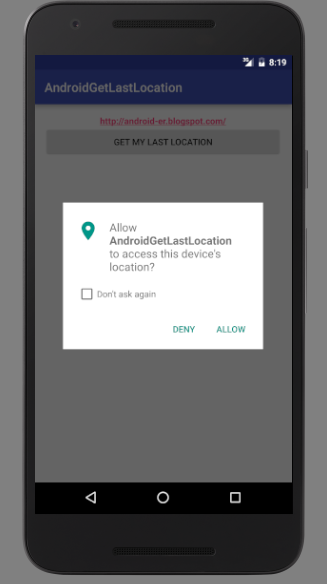
notice for sending location to Android Emulator: I have to open another app, Google Maps, to monitor location, otherwise my example cannot get the updated location.
Edit MainActivity.java from last post.
package com.blogspot.android_er.androidgetlastlocation;

import android.Manifest;
import android.content.pm.PackageManager;
import android.location.Location;
import android.net.Uri;
import android.os.Bundle;
import android.support.annotation.NonNull;
import android.support.annotation.Nullable;
import android.support.v4.app.ActivityCompat;
import android.support.v7.app.AppCompatActivity;
import android.view.View;
import android.widget.Button;
import android.widget.TextView;
import android.widget.Toast;

import com.google.android.gms.common.ConnectionResult;
import com.google.android.gms.common.api.GoogleApiClient;
import com.google.android.gms.location.LocationServices;

public class MainActivity extends AppCompatActivity
        implements GoogleApiClient.ConnectionCallbacks,
        GoogleApiClient.OnConnectionFailedListener {

    Button btnGetLastLocation;
    TextView textLastLocation;

    GoogleApiClient mGoogleApiClient;
    Location mLastLocation;

    static final int MY_PERMISSIONS_REQUEST_ACCESS_FINE_LOCATION = 1;

    @Override
    protected void onCreate(Bundle savedInstanceState) {
        super.onCreate(savedInstanceState);
        setContentView(R.layout.activity_main);
        btnGetLastLocation = (Button) findViewById(R.id.getlastlocation);
        btnGetLastLocation.setOnClickListener(btnGetLastLocationOnClickListener);
        textLastLocation = (TextView) findViewById(R.id.lastlocation);

        // Create an instance of GoogleAPIClient.
        if (mGoogleApiClient == null) {
            mGoogleApiClient = new GoogleApiClient.Builder(this)
                    .addConnectionCallbacks(this)
                    .addOnConnectionFailedListener(this)
                    .addApi(LocationServices.API)
                    .build();
        }
    }

    View.OnClickListener btnGetLastLocationOnClickListener = new View.OnClickListener() {
        @Override
        public void onClick(View v) {

            if (mGoogleApiClient != null) {
                if (mGoogleApiClient.isConnected()) {
                    getMyLocation();
                } else {
                    Toast.makeText(MainActivity.this,
                            "!mGoogleApiClient.isConnected()", Toast.LENGTH_LONG).show();
                }
            } else {
                Toast.makeText(MainActivity.this,
                        "mGoogleApiClient == null", Toast.LENGTH_LONG).show();
            }
        }
    };

    /*
    // Handle 'SecurityException' with try/catch
    private void getMyLocation(){
        try{
            //code should explicitly check to see if permission is available
            //(with 'checkPermission') or explicitly handle a potential 'SecurityException'
            //
            mLastLocation = LocationServices.FusedLocationApi.getLastLocation(mGoogleApiClient);
            if (mLastLocation != null) {
                textLastLocation.setText(
                        String.valueOf(mLastLocation.getLatitude()) + "\n"
                                + String.valueOf(mLastLocation.getLongitude()));
                Toast.makeText(MainActivity.this,
                        String.valueOf(mLastLocation.getLatitude()) + "\n"
                                + String.valueOf(mLastLocation.getLongitude()),
                        Toast.LENGTH_LONG).show();
            }else{
                Toast.makeText(MainActivity.this,
                        "mLastLocation == null",
                        Toast.LENGTH_LONG).show();
            }
        } catch (SecurityException e){
            Toast.makeText(MainActivity.this,
                    "SecurityException:\n" + e.toString(),
                    Toast.LENGTH_LONG).show();
        }
    }
    */


    //------------------------------------------------------------------------------
    //ref: Requesting Permissions at Run Time
    //http://developer.android.com/training/permissions/requesting.html
    //------------------------------------------------------------------------------
    private void getMyLocation() {
        if (ActivityCompat.checkSelfPermission(this, Manifest.permission.ACCESS_FINE_LOCATION)
                != PackageManager.PERMISSION_GRANTED
            && ActivityCompat.checkSelfPermission(this, Manifest.permission.ACCESS_COARSE_LOCATION)
                != PackageManager.PERMISSION_GRANTED) {
            // TODO: Consider calling
            //    ActivityCompat#requestPermissions
            // here to request the missing permissions, and then overriding
            //   public void onRequestPermissionsResult(int requestCode, String[] permissions,
            //                                          int[] grantResults)
            // to handle the case where the user grants the permission. See the documentation
            // for ActivityCompat#requestPermissions for more details.


            //------------------------------------------------------------------------------
            ActivityCompat.requestPermissions(MainActivity.this,
                    new String[]{Manifest.permission.ACCESS_FINE_LOCATION},
                    MY_PERMISSIONS_REQUEST_ACCESS_FINE_LOCATION);

            return;
        }
        mLastLocation = LocationServices.FusedLocationApi.getLastLocation(mGoogleApiClient);
        if (mLastLocation != null) {
            textLastLocation.setText(
                    String.valueOf(mLastLocation.getLatitude()) + "\n"
                            + String.valueOf(mLastLocation.getLongitude()));
            Toast.makeText(MainActivity.this,
                    String.valueOf(mLastLocation.getLatitude()) + "\n"
                            + String.valueOf(mLastLocation.getLongitude()),
                    Toast.LENGTH_LONG).show();
        }else{
            Toast.makeText(MainActivity.this,
                    "mLastLocation == null",
                    Toast.LENGTH_LONG).show();
        }
    }

    @Override
    public void onRequestPermissionsResult(
            int requestCode, @NonNull String[] permissions, @NonNull int[] grantResults) {

        switch (requestCode) {
            case MY_PERMISSIONS_REQUEST_ACCESS_FINE_LOCATION: {
                // If request is cancelled, the result arrays are empty.
                if (grantResults.length > 0
                        && grantResults[0] == PackageManager.PERMISSION_GRANTED) {
                    Toast.makeText(MainActivity.this,
                            "permission was granted, :)",
                            Toast.LENGTH_LONG).show();
                    getMyLocation();

                } else {
                    Toast.makeText(MainActivity.this,
                            "permission denied, ...:(",
                            Toast.LENGTH_LONG).show();
                }
                return;
            }

            // other 'case' lines to check for other
            // permissions this app might request
        }
    }

    @Override
    protected void onStart() {
        mGoogleApiClient.connect();
        super.onStart();
    }

    @Override
    protected void onStop() {
        mGoogleApiClient.disconnect();
        super.onStop();
    }

    @Override
    public void onConnected(@Nullable Bundle bundle) {
        getMyLocation();
    }

    @Override
    public void onConnectionSuspended(int i) {
        Toast.makeText(MainActivity.this,
                "onConnectionSuspended: " + String.valueOf(i),
                Toast.LENGTH_LONG).show();
    }

    @Override
    public void onConnectionFailed(@NonNull ConnectionResult connectionResult) {
        Toast.makeText(MainActivity.this,
                "onConnectionFailed: \n" + connectionResult.toString(),
                Toast.LENGTH_LONG).show();
    }
}
Related:
- Request Location Updates with LocationListener.onLocationChanged()


