Monday, August 17, 2015

RoboCop™ Cheats

Unlimited Money and Research Points, All Suites and All Weapons Owned and Fully Upgraded                                                                                                                                                                                                                                     RoboCop™ Cheats
 RoboCop™ Cheatsclick on the image to see more screenshot

UPDATED ON AUGUST 17, 2015

DESCRIPTION
 • RoboCop™ game save file
 • Unlimited Money
 • Unlimited Research Points
 • All Weapons Owned and Fully Upgraded
 • All Suites Owned and Fully Upgraded
 • Work to any game version
 • You can update the game after applied this cheat
 • Only work for rooted devices
 • Must be extracted using ES Explorer
note: your glue credit will not changed or replaced!

TESTED AND WORKS ON
  • RoboCop™ v3.0.6
  • Android 4.4.4 | 4.4.2 | 4.2.1

WARNING!!!
  • This will remove your current progress!
  • Backup your game data!

LET'S DO IT
  • Force stop game [Do Not clear data]
  • Download game save file | at the bottom of this page 
  • Extract to /data/data/ 
  • Overwrite existing files
  • Run your game and enjoy

IMPORTANT!
  • How to force stop game and clear data
  • How to extract game save to /data/data/
  • How to get access to /data/data/
  • How to find bestselling product  ads
  • How to backup game data
  • How to to root your device
  • How to check root on your device

Thursday, August 13, 2015

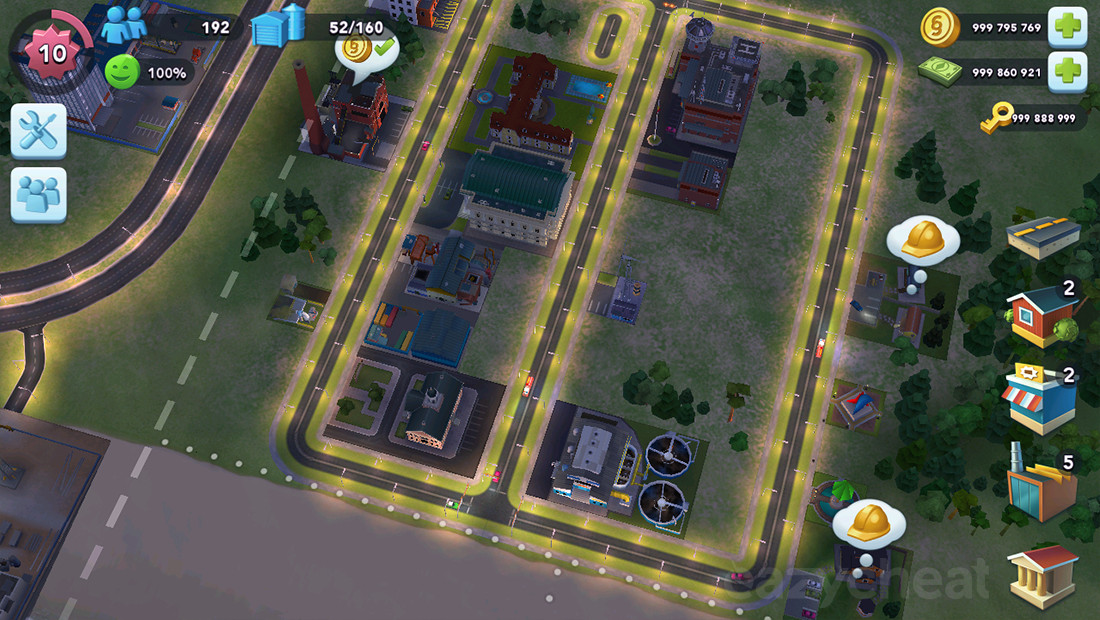
SimCity BuildIt Cheats

Unlimited Coins, Unlimited Money, Unlimited Keys                                                                                                                              SimCity BuildItCheats
SimCity BuildIt Cheatsclick on the image to enlarge the screenshot

UPDATED ON AUGUST 14, 2015

DESCRIPTION
 • SimCity BuildIt game save file
 • Unlimited Coins
 • Unlimited Money
 • Unlimited Keys
 • Work to any game version
 • You can update the game after applied this cheat
 • Also work for unrooted devices
 • Must be extracted using ES Explorer

TESTED AND WORKS ON
  • SimCity BuildIt v1.5.4.30271
  • Android 4.2.1 | 4.4.2 | 4.4.4

WARNING !!!
  • This will remove your current progress!
  • Backup your game data:

LET'S DO IT
  • Force stop game and clear data
  • Download game save file | at the bottom of this page
  • Extract to /Android/data/
  • Run your game and enjoy

IMPORTANT!
  • How to download game save file
  • How to force stop and clear game data
  • How to extract game save to /Android/data/
  • How to find bestselling product  ads
  • How to backup game data
  • How to to root your device
  • How to check root on your device

Tuesday, August 11, 2015

Angry Birds POP Bubble Shooter Cheats

Unlimited Gold, Unlimited Life.                                                                                                                                                                                                                                      Angry Birds POP Bubble Shooter Cheats
 Angry Birds POP Bubble Shooter Cheatsclick on the image to see more screenshot

UPDATED ON AUGUST 17, 2015

DESCRIPTION
 • Angry Birds POP Bubble Shooter game save file
 • Unlimited Gold
 • Unlimited Life
 • Will work to any game version
 • You can update the game after applied this cheats
 • Only work for rooted devices
 • Must be extracted using ES Explorer

TESTED AND WORKS ON
  • Angry Birds POP Bubble Shooter v1.9.6
  • Android 4.4.4 | 4.4.2 | 4.2.1

WARNING!!!
  • This will remove your current progress!
  • Backup your game data!

LET'S DO IT
  • Force stop game and clear data
  • Download game save file | at the bottom of this page 
  • Extract to /data/data/ 
  • Run your game and enjoy

IMPORTANT!
  • How to force stop game and clear data
  • How to extract game save to /data/data/
  • How to find bestselling product  ads
  • How to get access to /data/data/
  • How to backup game data
  • How to to root your device
  • How to check root on your device

Monday, August 10, 2015

Doraemon Gadget Rush Cheats

Unlimited Bells, Unlimited Dorayaki, All Characters and Gadgets Unlocked.                                                                                                                                                             Doraemon Gadget Rush Cheats
Doraemon Gadget Rush Cheatsclick on the image to see more screenshot

UPDATED ON AUGUST 10, 2015

DESCRIPTION
 • Doraemon Gadget Rush game save file
 • Unlimited Bells
 • Unlimited Dorayaki
 • All Characters and Gadgets Unlocked
 • Will work to any game version
 • You can update the game after applied this cheat
 • Only work for rooted devices
 • Must be extracted using ES Explorer

TESTED AND WORKS ON
  • Doraemon Gadget Rush v1.0.5
  • Android 4.4.4 | 4.4.2 | 4.2.1

WARNING!!!
  • This will remove your current progress!
  • Backup your game data!

LET'S DO IT
  • Force stop game and clear data
  • Download game save file | at the bottom of this page
  • Extract to /data/data/ 
  • Run your game and enjoy

IMPORTANT!
  • How to force stop game and clear data
  • How to extract game save to /data/data/
  • How to get access to /data/data/
  • How to backup game data
  • How to find bestselling product  ads
  • How to to root your device
  • How to check root on your device

Bubble Cat 2 Cheats

Unlimited Coins.                                                                                                                                                                                                                                      Bubble Cat 2 Cheats
 Bubble Cat 2 Cheatsclick on the image to see more screenshot

UPDATED ON AUGUST 10, 2015

DESCRIPTION
 • Bubble Cat 2 game save file
 • Unlimited Coins
 • Will work to any game version
 • You can update the game after applied this cheat
 • Only work for rooted devices
 • Must be extracted using ES Explorer

TESTED AND WORKS ON
  • Bubble Cat 2 v1.1.7
  • Android 4.4.4 | 4.4.2 | 4.2.1

WARNING!!!
  • This will remove your current progress!
  • Backup your game data!

LET'S DO IT
  • Force stop game and clear data
  • Download game save file | at the bottom of this page
  • Extract to /data/data/ 
  • Run your game and enjoy

IMPORTANT!
  • How to force stop game and clear data
  • How to extract game save to /data/data/
  • How to get access to /data/data/
  • How to backup game data
  • How to check root on your device
  • How to find bestselling product  ads
  • How to to root your device

Racing Fever Cheats

Unlimited Coins.                                                                                                                                                                                                                                      Racing Fever Cheats
 Racing Fever Cheatsclick on the image to see more screenshot

UPDATED ON AUGUST 10, 2015

DESCRIPTION
 • Racing Fever game save file
 • Unlimited Coins
 • Will work to any game version
 • You can update the game after applied this cheat
 • Only work for rooted devices
 • Must be extracted using ES Explorer

TESTED AND WORKS ON
  • Racing Fever v1.2
  • Android 4.4.4 | 4.4.2 | 4.2.1

WARNING!!!
  • This will remove your current progress!
  • Backup your game data!

LET'S DO IT
  • Force stop game and clear data
  • Download game save file | at the bottom of this page
  • Extract to /data/data/ 
  • Run your game and enjoy

IMPORTANT!
  • How to force stop game and clear data
  • How to extract game save to /data/data/
  • How to get access to /data/data/
  • How to backup game data
  • How to check root on your device
  • How to find bestselling product  ads
  • How to to root your device

Sunday, August 2, 2015

Bible Reading Plan

We know that reading and understanding the Bible is very important. To be able to understand the Bible properly, we need to understand the context of the passage that we read. Thus, many people advise to have a planned Bible reading and not to pick only the verses that you want to read. By this Bible reading plan the reader is expected to understand the outline of the Bible more clearly.

In the newly released Bible app, we now have a new reading plan menu. Currently it provides you with several reading plans:
  1. Bible Plan Gospels. Duration: 30 days. Only read all the Gospels.
  2. Bible Plan Psalms. Duration 31 days. Only read Psalms.
  3. Bible Plan Proverbs. Duration 31 days. Only read Proverbs.
  4. Blue Letter One Year Historical Plan, Duration 1 year. OT was ordered by Hebrew canon, NT was ordered by the time they were written.
  5. Blue Letter OT and NT. Duration 2 years. Read OT and NT daily.
  6. Blue Letter One Year Canonical. Duration 1 year. Read from cover to cover.
  7. M’Cheyne Bible Reading Plan. Duration 1 year. Daily read OT, NT, Psalms or Gospels.
  8. ESV Every Day in the Word. Duration: 365 days. Every day you will read Old Testament, New Testament, Psalms and Proverbs.
  9. ESV Daily Reading Bible. Duration 1 year. Every day OT, NT and Psalms.
  10. ESV Through the Bible in a Year Reading Plan. Duration 1 year. Every day OT and NT.
  11. Back To The Bible Chronological Reading Bible. Duration 1 year. Chronologically ordered.

This feature also helps you to save your progress by marking whenever you finish your daily reading.

To start using this reading plan. You need to go to Menu - Reading plan, you will see this screen:

You have to download the reading plan before you start using it. After you click "Download", a dialog will appear:

This is the selection of reading plans available as I already listed above. The list is complete with the description of each plans and its duration. From this dialog, you have to select one plan to start with. Let say you pick M'Cheyne Bible Reading Plan, you will get this screen:


On the title bar, we can see the title of the plan that you selected. You can download as many plans as you want, but it will not allow you to select the same plan you already downloaded. The title is actually a dropdown list, so if you really want to use some plans, you can choose the plan from the dropdown.
The screen above clearly shows that Nov 21 2013 is day 1 and today you have 4 passages you have to read. You can navigate to next day or previous day if you want to see your plan day by day or you can click "Show details" to show you the long list of your plan in one screen.

Now if you want to read today readings, you need to click today passage list (ex: Genesis 1; in the screen above). It will immediately open the Bible with the interface that you already familiar with.

This screen is the same screen that you normally see when you read the Bible. Nothing you need to learn here except that additional floating menu below. This reading plan menu will disappear in a few seconds and you can awake it up by scrolling.
The left and right navigation buttons is for you to go to the next reading in your selection day. If you finish reading it, you may check the check box, if you want to go back to the reading plan screen, you can tap the button in the middle (the one with the description). If you want to close you can tap the cross button.
While you are using this reading mode, you still can navigate to other chapter that are not in the reading plan using the left and right button as normal but the verse will be shaded . For example today reading is Genesis 1, but you are very curious about Genesis 2. It will look like this:

If you insist to read this chapter, you need to close the menu and it will clear the shading.

Lets go back to the reading plan screen, if you mark the reading, it will be reflected in the screen and you can see your progress by looking at the progress bar indicator.

The green is your actual progress. When you mark the reading, the green bar will increase. The red one is indicating how much you are left behind. For example as displayed above you have finished 9.66% from all readings you have to read in this plan. This number is reflected as the green bar. Until today, you have to read around 11.23%. It means you are left behind by 1.58%. This number is reflected as the red bar.

To read the whole bible in one year is not easy. Maybe you need to read around four chapters each day and if for some good reasons you are left behind and cannot catch up the target, you may want to realign your plan. You can do this by select the menu and select "Catch me up". This menu will move your last fully read day to yesterday or in another word your first unread reading will become today. So today you have to read the first unread reading. For example in the figure above today I have to read Genesis 43, Mark 13, Job 9 and Roman 13. But actually I have not started read Job yet. I even was stuck in Nehemiah 10. After I select "Catch me up" menu, I will get this screen.
If you compare the previous screen with this screen, you may notice that initially 21 November 2013 is day 41 but now it become day 20 and only left behind by 0.07%.
However you have to use it sparingly as you may see from the screen above, I reversed 21 days, and for 21 days I will only read 1 chapter. After these 21 days, it will be very hard for you to start reading 4 chapters each day again and maybe you will have forgotten that Genesis 43.

Currently it does not have any reminder for you to read your bible. For now you can use bible reminder from Devotion menu if you really need a reminder.

This reading plan menu is only a feature to keep track what you have read. Make sure you choose the best plan for you and feel comfortable with the plan because reading the whole bible in a year or two will not benefit much if you only read for the sake of finishing the bible. Lastly if you have another good reading plan please share with us so we can add in the future.